

MATLAB
MATLAB is a data analysis software package that is very popular amongst engineers and scientists. It has significant enterprise support, so it is often preferred over other open source/free software.
Running reports
Sample code below loads data from a 5min price report and plots it. Note: the CSV link is obtained from the NEOpoint platform.
url = "https://neopoint.com.au/Service/Csv?f=101+Prices%5CDispatch+and+Predispatch+Prices+5min&from=2021-07-14+00%3A00&period=Daily&instances=§ion=-1&key=******";
data = webread(url);

figure(1)
stackedplot(data, 'XVariable', 'DateTime');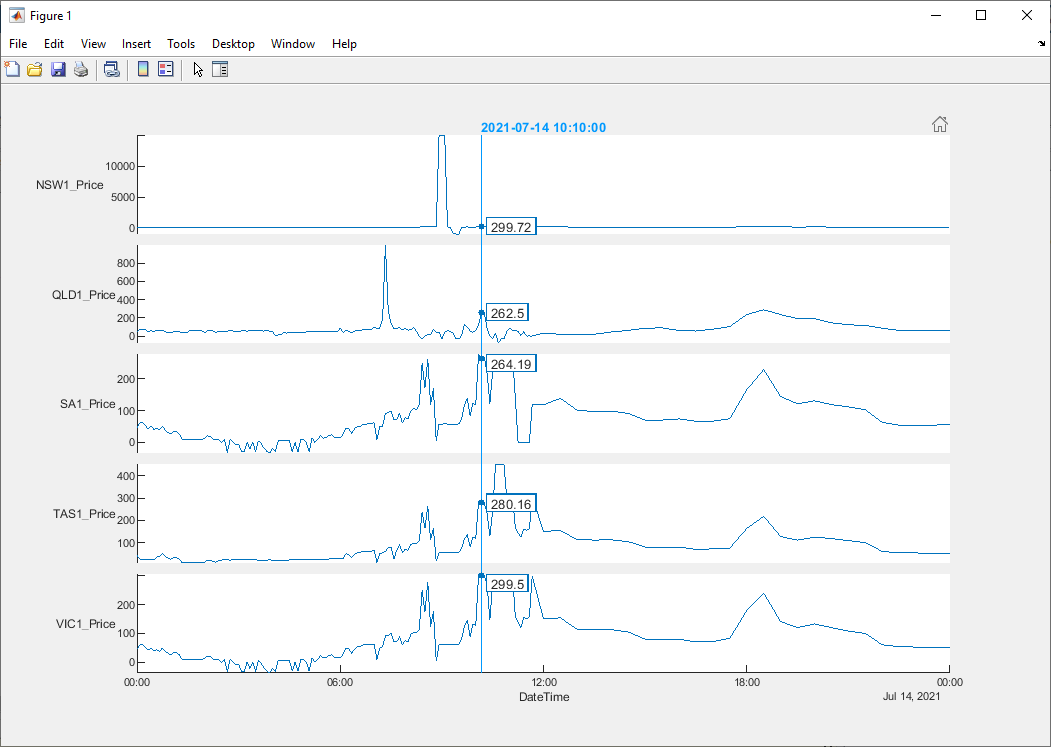
Running SQL queries
To run SQL queries you will need a QueryTool enabled account. Due to the limitation on the length of the GET request url, we have found that is better to use the POST HTTP method to obtain the results from custom queries, especially large queries. The MATLAB code below demonstrates an example where results for a query are downloaded using the POST method.
% Required imports
import matlab.net.http.RequestMessage
import matlab.net.http.field.ContentTypeField
import matlab.net.http.io.FormProvider

% Query to run
query = [
    'select `SETTLEMENTDATE`, `RUNNO`, `REGIONID`, `PERIODID`, `RRP`, `EEP`,'...
    '`INVALIDFLAG`, `LASTCHANGED`, `ROP`, `RAISE6SECRRP`, `RAISE6SECROP`,'...
    '`RAISE60SECRRP`, `RAISE60SECROP`, `RAISE5MINRRP`, `RAISE5MINROP`,'...
    '`RAISEREGRRP`, `RAISEREGROP`, `LOWER6SECRRP`, `LOWER6SECROP`, `LOWER60SECRRP`,'...
    '`LOWER60SECROP`, `LOWER5MINRRP`, `LOWER5MINROP`, `LOWERREGRRP`, `LOWERREGROP`,'...
    '`PRICE_STATUS` from mms.tradingprice where SETTLEMENTDATE between "2018-11-1" and "2018-11-2" limit 0, 10000'
];

% Constructing data payload for message
data = FormProvider('query', query, 'key', '******', 'format', 'csv');

% Constructing POST message
request = RequestMessage( ...
    'POST', ...
    (ContentTypeField( 'application/x-www-form-urlencoded' )), ...
    data ...
);

% Sending Request
response = request.send( 'https://neopoint.com.au/data/query' );

% Getting result
result = response.Body.Data;
Updated 16 days ago
Did this page help you?